By Daily Carry Lab. Primary documentation checked October 14, 2026 (Pacific).
Affiliate disclosure: As an Amazon Associate, Daily Carry Lab earns from qualifying purchases. Retailer links may earn a commission at no extra cost to you.
Research disclosure: We have not tested these products. Selection uses primary documentation and the compatibility decisions below; no DCL ratings or measured performance are claimed.
Identify the iPad in Settings before choosing a stylus. For iPhone Duo, see the separate USB-C Pencil host and cable-pairing section below. Apple Pencil Pro and Apple Pencil (USB-C) fit overlapping but different iPad generations. A USB-C socket or a magnetic edge alone does not establish compatibility.
We selected those two Apple models and Logitech Crayon with USB-C, silver 914-000070, to compare drawing controls, charging and a separate stylus design. These are documentation-based options; we have not tested line quality, palm rejection, battery endurance or app behavior.
Match the exact iPad generation
The table below condenses Apple’s compatibility list, checked October 14, 2026. It describes the listed Apple Pencils, rather than every third-party stylus.
| iPad model family | Compatible Apple Pencil models | Important distinction |
|---|---|---|
| Pro 11-inch or 13-inch, M4/M5 | Pro; USB-C | Pro requires iPadOS 17.5 or later; USB-C requires 17.1.1 or later |
| Air 11-inch or 13-inch, M2/M3/M4 | Pro; USB-C | Earlier Air 4/5 use a different magnetic Pencil generation |
| mini A17 Pro | Pro; USB-C | mini 6 instead supports 2nd generation and USB-C |
| Pro 11-inch generations 1–4; Pro 12.9-inch generations 3–6; Air 4/5; mini 6 | 2nd generation; USB-C | Pencil Pro is absent from Apple’s list for these models |
| iPad A16 or 10th generation | USB-C; 1st generation | 1st generation needs the USB-C to Apple Pencil Adapter for pairing and charging |
| iPad 6th–9th generation; Air 3; mini 5; Pro 12.9-inch generations 1–2; Pro 10.5-inch or 9.7-inch | 1st generation | These older models are outside the USB-C Pencil compatibility list |
Use the full list again if the iPad model differs from these entries. Similar screen size does not make generations interchangeable. Apple’s model-specific minimum software requirements also apply.
What the two current Apple options add
Apple’s feature comparison documents these differences. A check means Apple lists the feature; it is not a DCL performance score.
| Feature | Apple Pencil Pro | Apple Pencil (USB-C) |
|---|---|---|
| Tilt sensitivity | ✓ | ✓ |
| Pressure sensitivity | ✓ | — |
| Wireless pairing and charging | ✓ | — |
| Double-tap tool switching | ✓ | — |
| Squeeze and barrel roll | ✓ | — |
| Find My | ✓ | — |
Pencil Pro makes sense when the compatible iPad and drawing app can use pressure and the extra controls. Its drawback is the narrower iPad list: buying it cannot add support to an older iPad Pro or Air. Check the app’s support for the controls you actually want.
Pencil (USB-C) is an option for notes and markup when its compatibility list fits and pressure sensitivity is unnecessary. It pairs and charges through a USB-C cable; its magnetic attachment is for storage, rather than wireless charging. Sliding back its cap exposes the charging connector. Apple’s USB-C pairing instructions explain the cable connection. Its drawback is needing that connection and giving up the Pro’s drawing controls.
Where Logitech Crayon fits
The Crayon USB-C specification documents a replaceable tip, tilt-controlled line width, palm rejection and up to seven hours of active writing per charge. The current education datasheet lists iPads from 2018 onward, including the M2/M3/M4 Air family. Confirm the exact iPad and software with Logitech before purchase; Apple’s Pencil table does not certify a Crayon.
The selected silver USB-C model is 914-000070, identified in Logitech’s product register. Do not substitute a Lightning Crayon or assume an identically named regional SKU is the selected package. The listed USB-C design charges by cable; Logitech documents operation without a device-pairing step. Its drawback is a different control set from Pencil Pro, and the published seven-hour figure is a manufacturer claim, not our endurance measurement.
Budget, charging and packing
| Situation | Costs to compare; current totals unknown | Drawback to resolve first |
|---|---|---|
| Notes on a compatible USB-C iPad | Pencil USB-C or exact USB-C Crayon, cable and replacement tip if needed | Check generation and app support |
| Drawing that needs pressure | Compatible Pencil Pro and any app purchase | Pro cannot work around an incompatible iPad |
| Keeping a legacy Pencil | Any required adapter and a compatible case | A new iPad may require another Pencil generation |
| Traveling with a thick case | Stylus storage and access to the charging edge/connector | Magnetic storage or charging may be obstructed |
No current checkout prices or lowest-cost ranking are established here. Keep the iPad’s charging cable accessible, and check the USB-C cable guide for the separate charging-cable decision. Our tech pouch guide covers storage organization; it does not establish that a particular case holds any of these pencils.
A pairing failure can change the accessory decision
Before replacing a stylus, separate unsupported hardware from a missed setup step. Apple’s pairing troubleshooting, dated January 9 and checked October 22, 2026, starts with compatible Pencil/iPad models, current software and sufficient charge. Troubleshooting cannot add support to an incompatible generation.
| Selected stylus | Connection to check first | Purchase implication |
|---|---|---|
| Pencil Pro | Centre it on the compatible iPad’s magnetic connector | Check case obstruction before ordering another Pencil or case |
| Pencil USB-C | Open its sliding end and cable it to the compatible iPad; use Tap to Connect | Magnetic storage alone does not perform this pairing |
| Logitech Crayon USB-C | Follow Logitech’s own setup documentation above | Do not apply Apple’s Bluetooth reset sequence to a different design |
For Pro, Apple’s sequence keeps the Pencil connected during an iPad restart, checks Bluetooth, and removes its saved Bluetooth entry if present before pairing again. If the pairing prompt is absent, Apple specifies a one-minute charging wait before another attempt; for Pro or second-generation Pencil it also calls for removing cases or covers if pairing still fails. Persistent absence of the prompt may require service. These instructions do not establish that the battery or case is necessarily faulty.
The USB-C Pencil guide separately explains cable pairing and charging. It says pairing can need repeating after an iPad restart, Bluetooth being turned off or pairing to another iPad. That is a reason to keep the appropriate cable accessible, rather than treating every reconnect as a replacement-hardware decision.
Current service, cable and replacement-case totals are unknown. Resolve the documented connection first, then compare the full cost of keeping the existing stylus with replacing it. We have not tested these recovery steps or certified case clearance. This section supports a setup decision; it does not extend the compatibility table to any unlisted device.
Set up Pencil Pro recovery before relying on Find My
If finding a misplaced stylus is part of the reason to pay for Pro, include setup in the purchase decision. Apple’s iPad setup guide, checked October 25, 2026, directs you to open Find My, select Devices, attach Pencil Pro, choose Add and Apple Pencil, then follow the prompts.
| What you need | Evidence or preparation | Limitation |
|---|---|---|
| Locate Pencil Pro | Complete Find My setup before a trip | A feature tick in a buying table is not completed setup |
| Nearby guidance | Apple’s feature list identifies Find Nearby as iPad-only | Do not plan around an assumed iPhone equivalent |
| An audible alert or separation warning | Verify the exact product’s supported features | Apple’s Pencil Pro list does not list Play Sound or Notify When Left Behind |
Apple’s device-by-device feature list lists View Location on iPad, Find Nearby on iPad and Find My Lock for Pencil Pro; availability can vary by region. Do not transfer AirTag capabilities to the stylus. This does not add Find My to Pencil USB-C or Crayon. We have not tested recovery or promised successful retrieval. Keep the physical storage plan, and compare unknown replacement costs against the drawing features you actually need.
Handing on Pencil Pro includes a Find My ownership check
A used Pencil Pro needs an ownership check as well as the iPad compatibility check above. Apple’s Find My removal guide, checked October 27, 2026, explains that removing Pencil Pro from Find My removes its Find My Lock and lets another Apple Account add it on their iPad.
| Decision | What to establish | Purchase consequence |
|---|---|---|
| Give away or sell your Pencil Pro | In Find My on iPad, select Devices, the Pencil Pro, then Remove This Device | Include account removal in the handover |
| Buy a used Pencil Pro for Find My | Have the current owner complete their removal and check your own supported setup | Physical possession alone does not establish readiness for your account |
| Investigate pairing trouble | Keep Apple’s separate pairing checks above | Account removal is not a universal pairing repair |
Use the Pencil Pro subsection of Apple’s instructions; the nearby AirTag procedure is different. We do not infer an AirTag reset method for Pencil Pro, a bypass for another person’s account, or a guarantee that a used stylus is otherwise functional. DCL has not tested ownership transfer. Current used and new prices are unknown; resolve compatibility and account readiness before comparing offers.

Duo changes which Pencil belongs in a shared phone-and-iPad kit
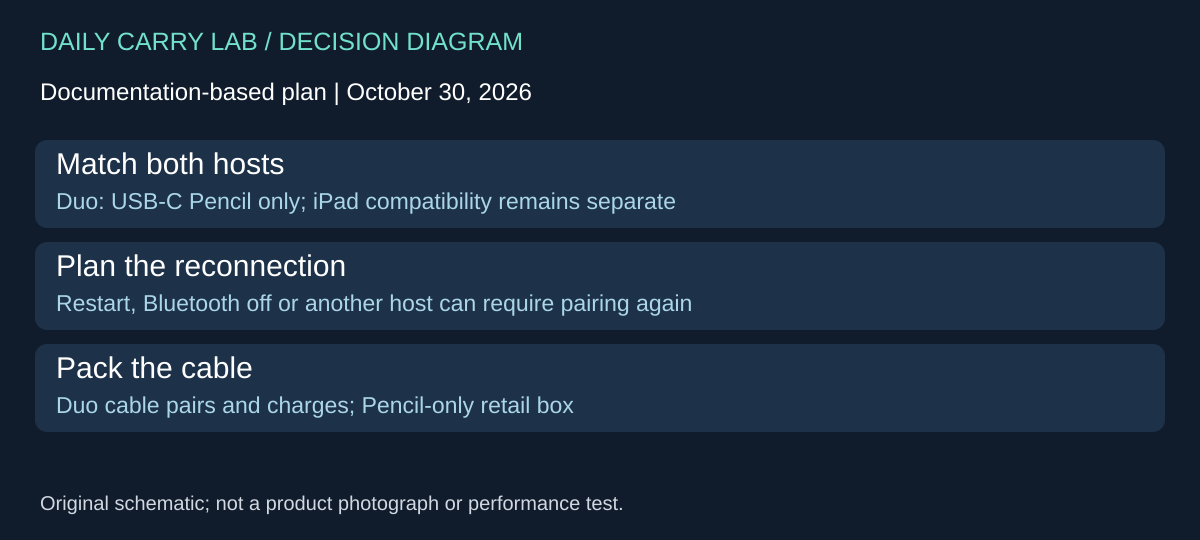
Research addition checked October 30, 2026. iPhone Duo supports Apple Pencil (USB-C); other Pencil models are incompatible. That makes the USB-C model the candidate to evaluate when you want one stylus for Duo and a separately compatible iPad. Owning Pencil Pro for your iPad does not solve the Duo requirement. This is new host coverage for an existing stylus, not a new Pencil generation or a DCL drawing test.
Apple’s Duo pairing guide specifies the included Duo USB-C charge cable: open the Pencil end, connect both devices and tap the connection prompt. Charging occurs while connected. The guide also permits charging through a USB-C cable and power adapter. Magnetic attachment is not a substitute for this connection.
| Planned host | Supported choice and action | Limitation to accept |
|---|---|---|
| Duo only | Apple Pencil USB-C; pair by cable | Pencil Pro and other Pencil models do not qualify |
| Duo plus a compatible iPad | Check both host lists; reconnect to the intended host | Do not expect one pairing to stay active across both devices |
| iPad drawing with Pro controls | Retain the separately compatible Pro arrangement if needed | One USB-C Pencil does not inherit Pro’s features |
| A different phone or third-party stylus | Obtain its own exact compatibility evidence | Duo’s Pencil support does not certify that combination |
Apple says to repeat pairing after restarting Duo, turning Bluetooth off, or pairing the Pencil with another device. For shared-host travel, keep the cable accessible rather than packing it away after initial setup. Decide whether reconnecting is acceptable before choosing one shared Pencil over two separate styluses. That inconvenience is a workflow tradeoff, not evidence that the Pencil is defective.
The US MUWA3AM/A product page lists Duo and selected iPads; its box lists the Pencil alone. Budget for the actual missing pieces: a suitable cable, any separate charging supply and physical storage. Current complete-kit totals and stock are unknown. Reusing Duo’s included cable may avoid another purchase if it remains available during your work; we have not tested simultaneous phone charging or a third-party cable.
Check battery level in the Batteries widget or Settings > Apple Pencil before leaving the charger, as documented in the Duo guide. Keep the iPad-generation checks above: adding a supported phone does not make a previously incompatible iPad work. We have not tested handwriting latency, apps, storage fit or host switching. The selection case here is supported dual-host use with an explicit reconnection plan, rather than a promise that the least expensive Pencil replaces every other model.
Shop the researched models
These Amazon links are affiliate links. Daily Carry Lab may earn a commission from qualifying purchases. Match the model and included contents to your needs; this guide is based on manufacturer-source research, without hands-on testing.
-
Apple Pencil Pro (MX2D3AM/A)
Check Apple Pencil Pro (MX2D3AM/A) on Amazon -
Apple Pencil USB-C (MUWA3AM/A)
Check Apple Pencil USB-C (MUWA3AM/A) on Amazon -
Logitech Crayon USB-C (914-000070)
Check Logitech Crayon USB-C (914-000070) on Amazon
Sources and limits
This guide compares published specifications and source documentation. Daily Carry Lab has not performed hands-on tests of the products in this guide. Consult the dated sources and verify the exact model and current terms before buying.
- pencil-compatibility primary documentation
- pencil-features primary documentation
- pencil-usbc primary documentation
- crayon-support primary documentation
- crayon-datasheet primary documentation
- crayon-sku primary documentation
- pencil primary documentation
- Set up Pencil Pro recovery before relying on Find My primary documentation
- Set up Pencil Pro recovery before relying on Find My primary documentation
- Handing on Pencil Pro includes a Find My ownership check primary documentation
- October 30 pencil-duo primary documentation
- October 30 pencil-store primary documentation
Related guides
Portable document scanners: choose the feed, power and file workflow
Compare Epson ES-50 and ES-60W simplex workflows with discontinued Brother DS-740D duplex limits, USB power and current software checks.
USB-C Ethernet adapters: match the host, driver and network rate
Compare TP-Link, Plugable and Belkin INC012 Ethernet adapters by host connector, link rate, tether reach and complete kit. Research; throughput untested.
Single-port 65W laptop chargers: profiles, plugs and cable limits
Compare Anker A2663 and Supertiny 65W for one USB-C laptop, including PPS evidence, plug variants and cable limits.
E Ink note-taking tablets: Scribe, reMarkable or BOOX?
Compare exact Kindle Scribe, reMarkable Paper Pro and BOOX Go10.3 Gen II models by pens, file export, lighting and subscription limits.