
By Daily Carry Lab. Primary documentation checked October 14, 2026 (Pacific).
Affiliate disclosure: As an Amazon Associate, Daily Carry Lab earns from qualifying purchases. Retailer links may earn a commission at no extra cost to you. Manufacturer links below are evidence sources.
Research disclosure: This guide uses primary documentation. We have not tested these products and assign no DCL rating or measured performance result.
Buy an SD reader by the interface your card uses and the computer or phone you will connect it to. A USB-C plug does not tell you whether the reader supports UHS-II, microSD Express or CFexpress. A fast card also cannot make an older reader use an interface it does not support.
We selected Apple’s USB-C to SD Card Reader MW653AM/A and the SanDisk Extreme PRO SD UHS-II USB-C reader SDDR-409 family because the manufacturers explicitly describe UHS-II SD support and USB-C connection. This is a standalone-reader decision, not another dock shortlist. We have not timed imports, tested phone apps, or ranked reliability. The card, reader, host and destination storage all affect a real transfer.
Compare the two documented readers
| Feature | Apple USB-C to SD Card Reader, MW653AM/A | SanDisk Extreme PRO SD UHS-II USB-C, SDDR-409 family |
|---|---|---|
| Host connector | USB-C | USB-C |
| Documented card interface | UHS-II SD; backward-compatible other SD cards/adapters | UHS-II; backward-compatible UHS-I/non-UHS SD |
| microSD arrangement | Check exact card/adapter compatibility | Manufacturer lists microSD with adapter |
| Host support evidence | Apple lists compatible USB-C Macs, iPads, iPhones | Manufacturer lists Mac/PC with USB-C |
| USB link rate evidence | Product page does not state a numeric USB tier | USB 3.0 interface listed |
| Main selection limit | No universal Android/app compatibility inferred | No phone-import compatibility claim established here |
Sources: Apple’s exact reader page and SanDisk’s product page. The captured SanDisk page displays model SDDR-409-C46. A different query-selected regional suffix displayed the same page identity; we do not certify that another suffix or retailer bundle is the identical variant. Verify the model printed on the actual offer before purchase. We omit the page’s questionable dimensions and make no packed-size comparison.
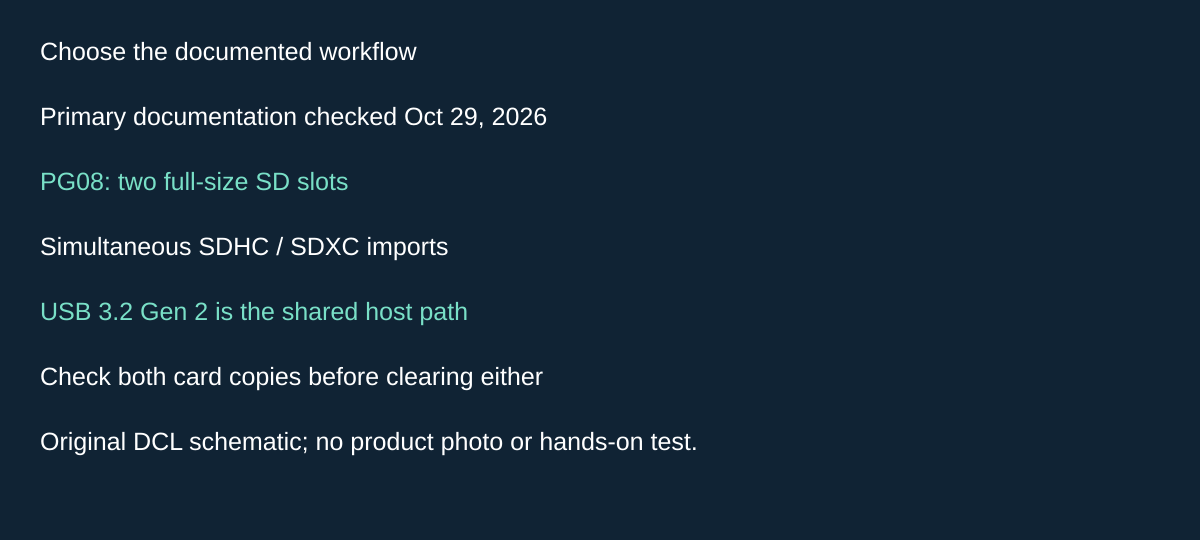
Original DCL research schematic, October 29, 2026; documented choices, not a product photograph or DCL test.
Consider PG08 when two SD cards need importing together
A single-slot reader is adequate when you import one camera card at a time. If two SD cards regularly arrive together, ProGrade Digital PG08 adds a materially different option: two full-size SD slots with documented simultaneous transfer. We include it for that workflow, without claiming it finishes twice as quickly as either reader above.
The current PG08 manufacturer page, checked October 29, 2026, lists SDHC, SDXC, UHS-I and UHS-II support and a USB 3.2 Gen 2 host connection. Its 10Gb/s statement describes the interface ceiling; it is not a measured per-card copy speed. ProGrade qualifies full interface performance on compatible host, cable and device support. We have not timed concurrent imports.
| What needs importing | Reader choice to investigate | Cost or drawback |
|---|---|---|
| One supported SD card | Existing built-in reader, Apple or SanDisk above | A second slot may provide no useful benefit |
| Two full-size SD cards together | PG08 dual SD arrangement | Both copies still share the host and destination resources |
| One SD and one CFexpress card | A reader explicitly supporting that CFexpress type | PG08 is the SD/SD model, not similarly named mixed-card hardware |
| Files onto a phone | Exact host, application and destination workflow | A computer transfer claim does not settle every phone import task |
Before buying, list the two card interfaces and the drive receiving the files. Check whether your import software can keep both jobs and their destinations distinct. Our suggested preparation is to import disposable sample folders from both cards, verify the resulting files and only then decide whether simultaneous operation saves useful time. This is advice, not a DCL software or transfer test.
Budget: exact delivered totals remain unknown. Count the needed data cable and any host adapter, and keep a working single-slot reader if it already meets your turnaround needs. The manufacturer page supplies no independently verified retailer bundle here; this candidate remains source-only. Keep original media until copies are checked. Two readable cards attached to one computer do not themselves create a backup.
Identify the card interface
The SD Association bus overview separates UHS-I, UHS-II and SD Express interfaces. UHS-I uses one row of pins, while the newer interfaces have additional contact arrangements. Similar card shape or an adapter that physically fits does not demonstrate support for every faster interface.
| Card or workload | Reader requirement to verify | Common purchase mistake |
|---|---|---|
| Conventional UHS-I SD | Explicit UHS-I support and suitable host | Paying for a faster tier without a workflow need |
| UHS-II SD camera card | Explicit UHS-II support | Assuming USB-C means UHS-II |
| microSD throughSD adapter | Exact card/adapter/reader support | Treating adapter fit as proof of every speed mode |
| microSD Express orSD Express | Explicit Express support and compatible host | Assuming UHS-II reader offers Express speeds |
| CFexpress | Reader listing the exact CFexpress type | Choosing an SD reader because both names containExpress |
Neither selected reader’s cited product page establishes Express-mode or CFexpress support. If you use those cards, choose a reader with explicit documentation for that interface; these two are not validated substitutes. Keep minimum recording-speed classes separate from import speed: the SD Association speed-class guide addresses recording-related performance classes, which are not a timed copy result from your computer.
Check the USB side without predicting copy times
USB-IF’s USB3.2 language guidelines define 5Gbps and 10Gbps performance categories separately. A faster USB host connection can remove one possible bottleneck only when the rest of the path supports it. A 10Gbps port does not turn a 5Gbps reader into a 10Gbps reader, and an adapter or hub can add its own limit.
For the SanDisk reader, the manufacturer identifies USB 3.0. We do not assign a numeric USB tier to the Apple reader where its cited page does not state one. UHS-II support is documented for both, but that does not establish identical real-world transfer rates. Check the selected host port, intermediate adapters and destination drive, then measure your own representative import if timing matters.
When your hub’s reader is enough
If your existing hub explicitly supports the card interface you use and imports reliably for your workload, another reader may solve no current problem. A standalone reader becomes useful when it provides a missing card interface, a better-documented host connection or lets you avoid carrying a full hub when only card import is needed. It still occupies a host port and adds another small item to lose.
Read the exact reader section in the compact USB hub guide or your hub manual. Do not infer that a dock’s high headline bandwidth belongs entirely to its card slot. Multiple devices can use the same upstream connection, and the reader’s own interface specification remains relevant.
| Budget approach | Evidence on October 14, 2026 | Drawback |
|---|---|---|
| Keep an adequate built-in/hub reader | No new purchase if already suitable | Card interface may be limited |
| Apple MW653AM/A | Delivered checkout price not verified | Verify exact Apple host/app workflow;no numeric USB tier stated here |
| SanDisk SDDR-409 | Delivered checkout price not verified | Regional variant/host identity checks;microSD needs adapter |
| DedicatedExpress or CFexpress reader | No verified shortlist orpriceband supplied | Must match specific card type; these SD picks are not validated for it |
Before buying, write down the card’s exact interface, host model, required adapter and import application. Compare offers only after those fields match. Copy to your working storage and verify the import before erasing a card; this is workflow advice, not a claim of tested backup software. The right reader fills a documented compatibility gap rather than simply repeating a dock’s card-slot feature.
Missing Photos imports are not automatically a reader-speed problem
For the Apple reader, confirm the content workflow before paying for a faster alternative. Apple’s camera-adapter import guidance, published June 2 and checked October 22, 2026, includes the USB-C to SD Card Reader. It limits camera-adapter importing to camera-captured content and warns that renamed, edited or copied media may not import. An unsupported format may also prevent viewing on the device.
| Content situation | Check before ordering another reader | Limitation |
|---|---|---|
| Original camera files | Match the device, media format and Photos workflow | Physical recognition alone is insufficient |
| Renamed or edited files | Preserve the originals and check the documented import restriction | Faster hardware does not establish content eligibility |
| Files copied onto a card from a computer | Establish a suitable supported file-transfer workflow separately | Do not assume camera import is general file browsing |
| Import offers deletion | Keep source media until the copies are independently verified | Import completion alone is not our certification of a backup |
Apple’s article gives version-specific Photos navigation, including distinct iOS 18 and older instructions. Use documentation matching your installed system rather than treating a missing tab as proof of a broken reader. The same article warns that reformatting erases card images; do not format a card of wanted files as an initial compatibility experiment.
This adds evidence for Apple’s camera-adapter Photos workflow, not an all-reader guarantee for SanDisk, every RAW format or the Files app. We have not performed imports or recovered missing images. Compare the complete reader/host/application fit before spending; current replacement costs remain unknown.
Use a connection checklist before formatting or replacing hardware
Apple’s camera-adapter troubleshooting, published June 2 and checked October 24, gives a connection sequence for missing Devices or Import in iOS 18. This extends the content-eligibility checks above.
- Check the installed system against Apple’s current instructions; for a camera connection, confirm the camera is on and in its image-export mode.
- Disconnect the adapter, wait 30 seconds, and reconnect. Separately disconnect the card or camera, wait 30 seconds, and reconnect.
- Restart the iPhone or iPad; for a camera, switch it off and on too.
- If available, compare with another card or camera. Success with the alternative points to a possible issue with the original media or its data; it does not prove a speed-tier deficiency.
| Next decision | Preserve first | Spending implication |
|---|---|---|
| Investigate the original card elsewhere | Import wanted media to another device/computer | Another reader may be unnecessary |
| Consider formatting in the camera | Verify preserved copies; formatting erases images | Do not buy speed or sacrifice originals as a first experiment |
This is Apple’s camera-adapter workflow, not a diagnosis for every SanDisk reader or application. No import, recovery or fault-isolation test was performed by DCL. Current replacement costs remain unknown.
Check the export workflow when the card must receive originals too
Import speed is only half the fit if you want to move originals from an iPhone or iPad back to removable media. Apple’s camera-adapter import and export instructions, published June 2 and checked October 25, 2026, include the Apple USB-C to SD Card Reader and describe a Photos export workflow. This is stronger evidence for that specific workflow than assuming any reader recognized by the phone supports every photo application.
In Apple’s documented sequence, connect the adapter and card or camera, open Photos and select the photos and videos. Use Share, then Export Unmodified Originals. Navigate back until the destination chooser is available, select the card or camera under Locations, and save. Use the current instructions for your device if its interface differs; we have not reproduced the steps.
| What you want on the card | Decision before choosing the reader | Drawback or unresolved requirement |
|---|---|---|
| Original photo/video files from Photos | Check the documented Export Unmodified Originals route and destination | This instruction does not establish export of the visible edited appearance |
| A copy for another device or person | Confirm that device can open the exported originals | Successful writing alone does not prove compatible viewing or playback |
| A second copy before clearing phone storage | Verify the destination files independently before deleting anything | This is a transfer workflow, not a verified backup system |
| General files from another application | Obtain that application’s and host’s own documentation | These Photos instructions do not establish an all-app file-management guarantee |
The practical selection difference is a documented round-trip media workflow, rather than a faster import specification alone. Do not promise rendered edits, automatic organization, every RAW format or a particular transfer time from the word “originals.” The same Apple page does not establish equivalent behavior for the SanDisk alternative. Current delivered reader/card totals remain unknown; if your existing supported adapter already meets this workflow, the documentation does not establish a need to buy another reader. We have not performed exports, checked file integrity or tested any destination camera.
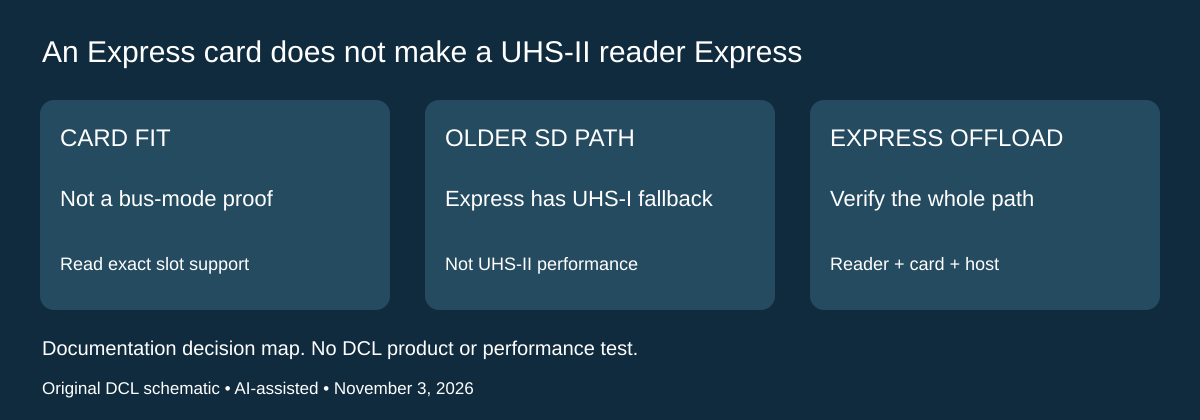
An SD Express card does not upgrade a UHS-II reader
Research addition, November 3, 2026. The reader interface matters even when a newer card fits. A photographer choosing a reader for both existing UHS-II cards and a possible SD Express purchase should verify both operating paths explicitly. Two rows of contacts are not enough evidence that two different interfaces run at the same speed.
The SD Association’s SD 8.0 Express white paper, retrieved today, states that SD Express cards cannot support the UHS-II interface. Its discussion of the contacts also documents a legacy UHS-I interface in the first row. This explains why backward compatibility is different from obtaining the reader’s UHS-II performance. The document describes that standards generation; it does not certify a particular card, adapter or reader listing.
| Kit you are considering | Evidence needed before ordering | Purchase mistake to avoid |
|---|---|---|
| Existing UHS-II card and UHS-II reader | Exact card/reader and host support | Assuming another card generation shares the same mode |
| Express card in an older supported SD host | Confirm its documented legacy SD/UHS-I path and capacity support | Treating physical access as Express performance |
| Express card at Express speeds | Explicit compatible Express card and reader/host path | Expecting a UHS-II-only reader to supply PCIe/NVMe operation |
| Mixed card collection | Verify each required format and operating mode | Paying for a new card while the offload bottleneck remains |
The current bus overview describes SD Express using PCIe and NVMe, separately from UHS bus modes. Neither a USB-C plug on the reader nor its USB link’s maximum establishes Express support at the card slot. Verify the exact reader documentation before transferring any newer card’s headline speed to the Apple, SanDisk or PG08 readers discussed above. We have not accepted an Express-reader claim for those selections here.
Selection and budget: retain a suitable reader if all actual cards and workloads use its supported modes. If an Express card is essential for another device, price the complete compatible offload path before buying it for its maximum transfer claim. Current reader/card/adapter totals are unknown. Existing UHS-II cards may still be the relevant reader requirement, while a planned Express card introduces another interface check. Do not let that offload decision override the camera’s approved recording-card list, capacity limit or required speed class. We have not benchmarked fallback operation or tested any Express combination.
Shop the researched models
These Amazon links are affiliate links. Daily Carry Lab may earn a commission from qualifying purchases. Match the model and included contents to your needs; this guide is based on manufacturer-source research, without hands-on testing.
-
Apple MW653AM/A
Check Apple MW653AM/A on Amazon -
SanDisk SDDR-409
Check SanDisk SDDR-409-G46 on Amazon
Sources and limits
This guide compares published specifications and source documentation. Daily Carry Lab has not performed hands-on tests of the products in this guide. Consult the dated sources and verify the exact model and current terms before buying.
- www.apple.com documentation
- www.sandisk.com documentation
- www.sdcard.org documentation
- www.usb.org documentation
- www.sdcard.org documentation
- apple-import primary documentation
- October 29 editorial-card-reader primary documentation
- SD Association SD8.0 white paper: SD7/8 physical interfaces and first-row UHS-I pp5–6
- SD Association current bus overview: SD Express PCIe/NVMe
Related guides
Portable document scanners: choose the feed, power and file workflow
Compare Epson ES-50 and ES-60W simplex workflows with discontinued Brother DS-740D duplex limits, USB power and current software checks.
USB-C Ethernet adapters: match the host, driver and network rate
Compare TP-Link, Plugable and Belkin INC012 Ethernet adapters by host connector, link rate, tether reach and complete kit. Research; throughput untested.
Bluetooth numeric keypads: check layout, host and charging
Compare Satechi ST-XLABKM with the documented Microsoft Number Pad Windows route. Check layout, host support and replaceable battery versus charging.
Compact drawing tablets: active area and current driver checks
Compare One by Wacom Small CTL-472 by drawing area, packed size and dated Windows/Mac driver support. Screenless pen input tradeoffs without testing claims.